ABYSS VANISH / DEVELOPMENT JOURNAL
Small Models as First Users
November 6: four Haiku agents and two Sonnet agents built a landing page or an app each from the engine's UI docs alone; every place they got stuck was fixed in the engine.
On November 6 we ran a test: hand Abyss Engine's UI documentation to small models as if they were developers arriving for the first time. First four Claude Haiku agents, then two Claude Sonnet agents, each built a landing page or an app from the docs alone, with no window: laid out well from a phone's width to 1920, with motion, Traditional Chinese and English, sound, and keyboard and screen-reader use, and then a list of every place the docs failed them. My thinking was that small models are cheap and read docs literally, so wherever a person would trip, they usually trip first. Other agents checked their reports against the code; what was real was fixed in the engine with a test each, and the rest went into the docs. Agents wrote the code and the fixes; I set the task, and in the evening tried things myself, which turned up one more.
Only the docs
- Development
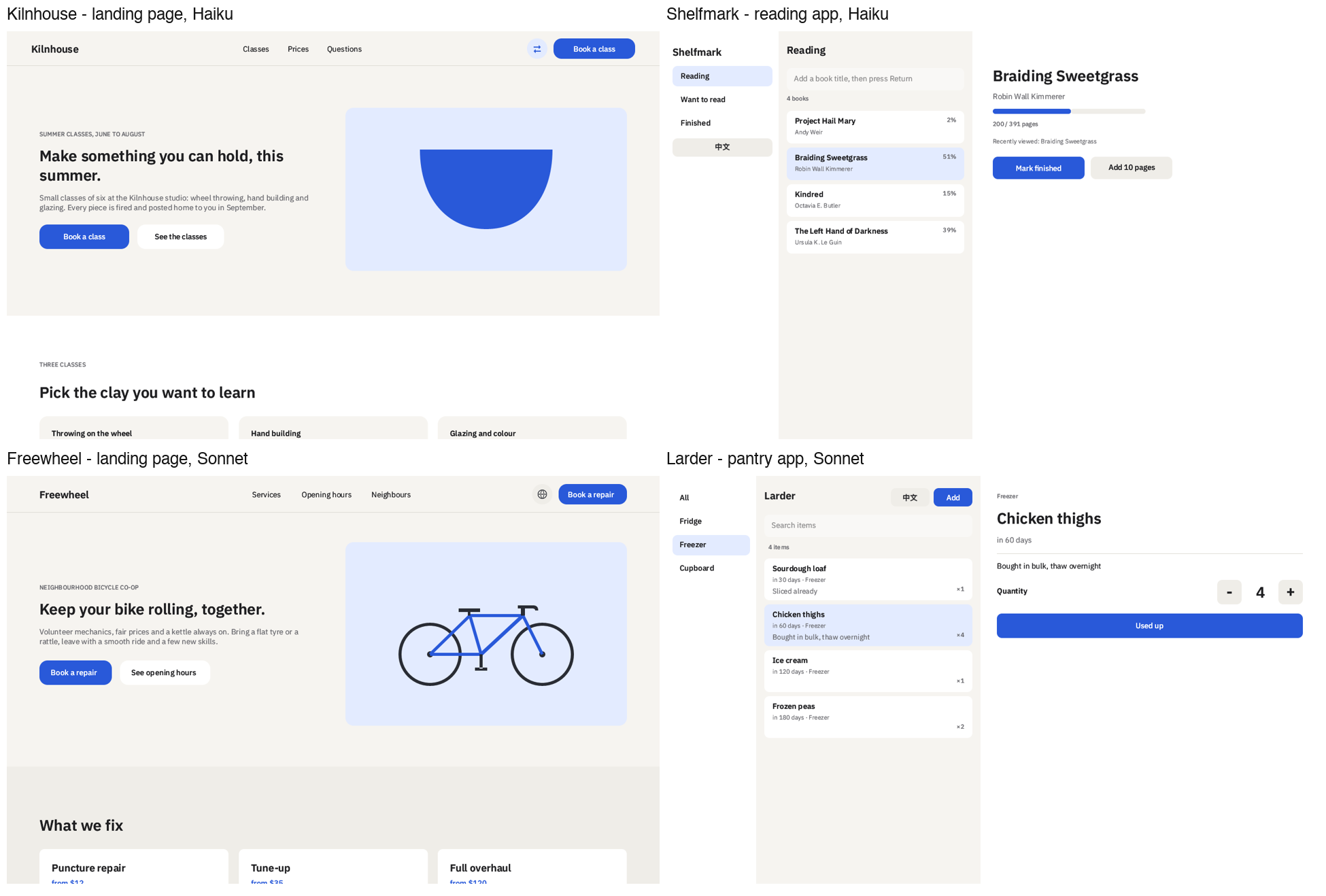
- The first round was four Haiku agents: two landing pages and two apps, among them Kilnhouse, a pottery studio's page, and Shelfmark, a reading tracker. Later, two Sonnet agents made Freewheel, a bicycle co-op's page, and Larder, an app for what is in the fridge and the cupboard. The four below were all made from the docs alone.
- Difficulty
- Most of what they hit was small things the docs did not say or the engine did not do yet: Tab onto a button below the window did not scroll the page; a screen reader's label did not change with the language; on a phone's detail pane, a search field stayed in the window's corner; an icon that lit on hover inside a button was read as a second button; an empty column in the database stopped the whole list. And two landing pages passed the checking tool, then were refused when run at 390 wide: the tool had only laid them out at desktop size.
- What changed
- Each one was fixed in the engine, with a test that fails without the fix. Kilnhouse's prices sit below the window; now the eighth Tab brings Monthly to the middle of the window. The checking tool also lays every page out at a phone's 390 × 844 and at 1920 × 1080. The docs gained what the agents had asked about: Tab and reading order, how to mark cards that only answer hover, and screen-reader labels that follow the language.
- Still open
- All of this ran with no window, and the pictures are drawn by the engine itself; the test works are not on this site.
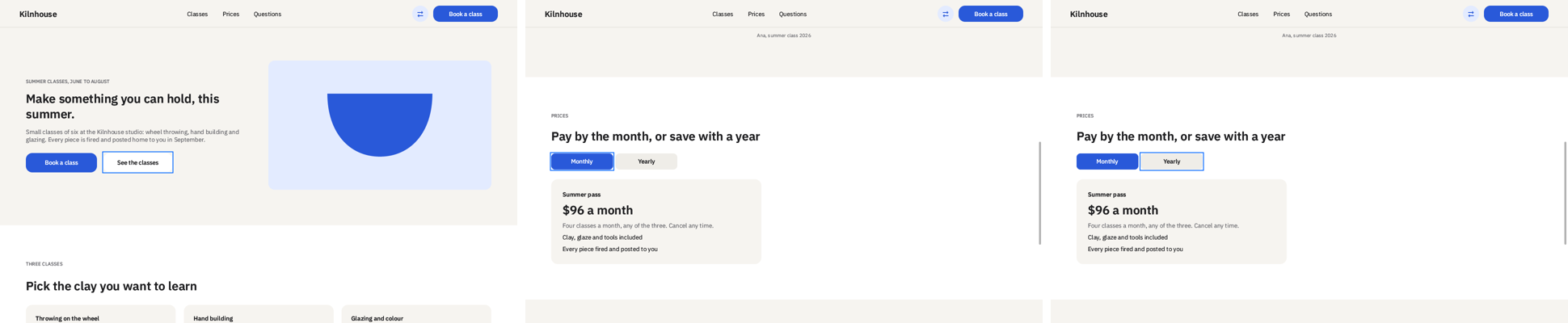
After the seventeenth Han character
- Development
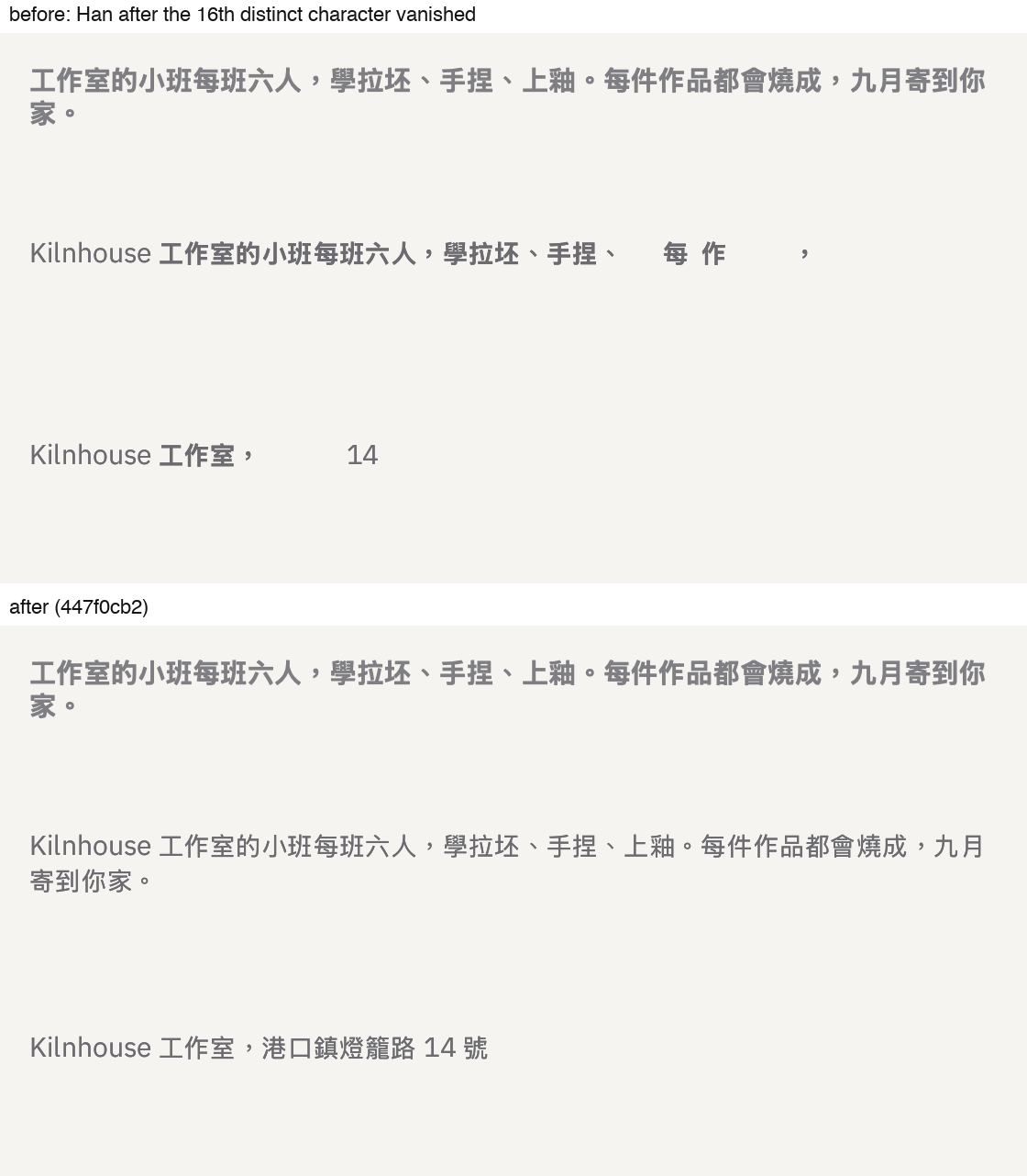
- Kilnhouse has a Chinese version, with English and Chinese in one line, such as 「Kilnhouse 工作室,港口鎮燈籠路 14 號」. Drawn, it kept only the Latin, the digits and a few Han characters seen earlier.
- Difficulty
- On Apple, a character the paragraph's faces lack is drawn in a system face, and the engine kept a table of which face each character uses. The table had sixteen rows and never let go of one: in a running program, from the seventeenth distinct Han character on, no new one was drawn again. A packaged app uses Plex Sans, a Latin face, and leaves Han to the system, so Tendwell in Chinese hit it too. Lines that are all Han were fine, because the system lays them out.
- What changed
- The table is now keyed by the character's own bytes and placed by hash in 4,096 rows; a row another character took is asked again, never left blank. The test is "Ab" plus 40 distinct Han characters: all 40 drawn, where the old table drew 16. Lines with at most 16 distinct Han characters draw the same pictures before and after.
- Still open
- This one is done. What stays is a test that fails if it ever comes back.
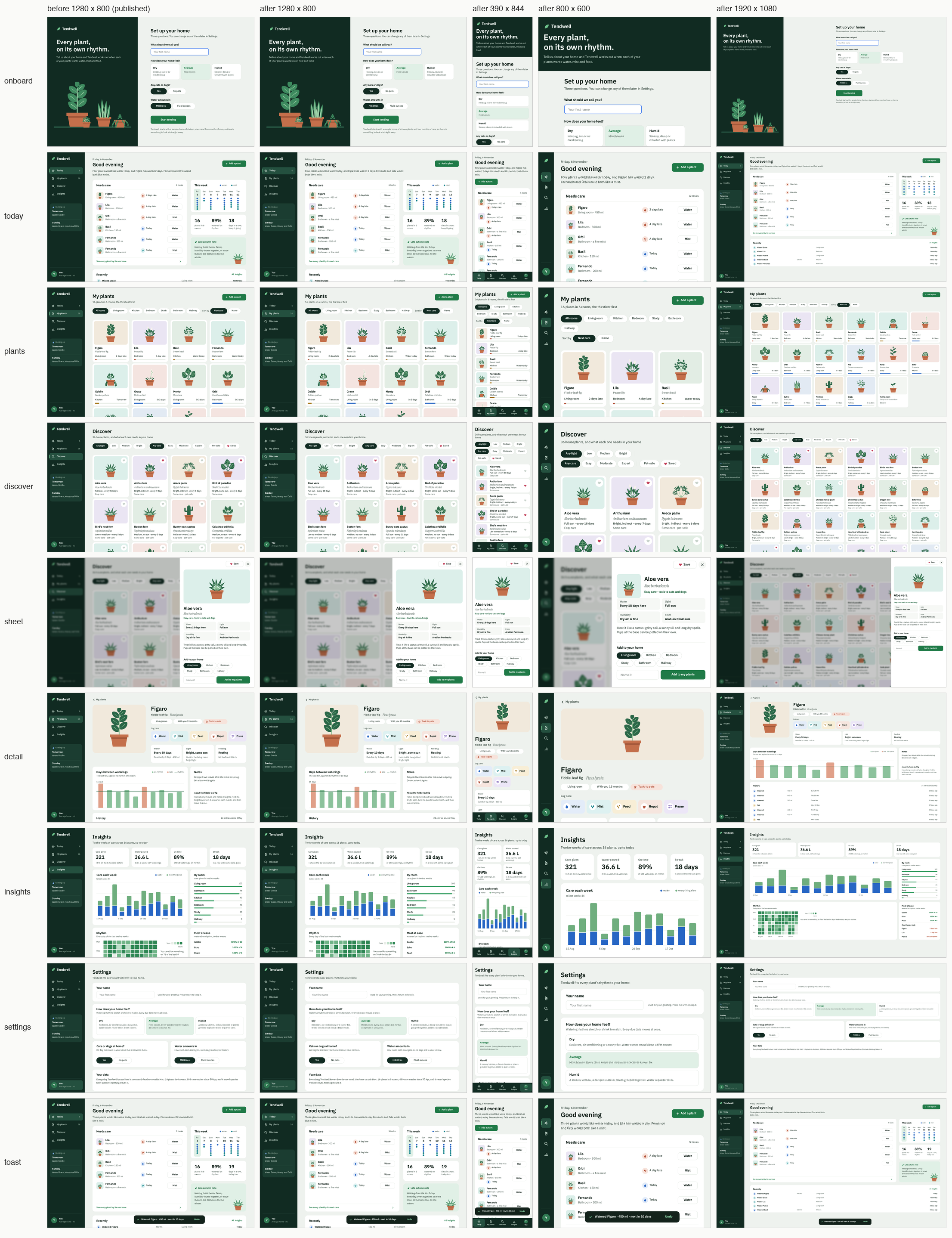
Tendwell follows its window
- Development
- Tendwell is the plant-diary app from the October 30 entry. Once I said it could be updated, it was changed to lay itself out by its window, from a phone's 390 × 844 to 1920 × 1080: from 1100 wide the rail sits beside the content, under 1100 it slims to a row of icons, under 760 it becomes a bar along the foot. Plant cards fill as many columns as fit and become rows on a phone. At 1280 × 800 every screen draws as the published build did: compared pixel by pixel, the only difference is antialiasing on 48 pixels, at most 8/255. Motion became declared too: list rows rise in one after another, the species sheet slides in from the side, and a toast leaves by itself after four seconds.
- Difficulty
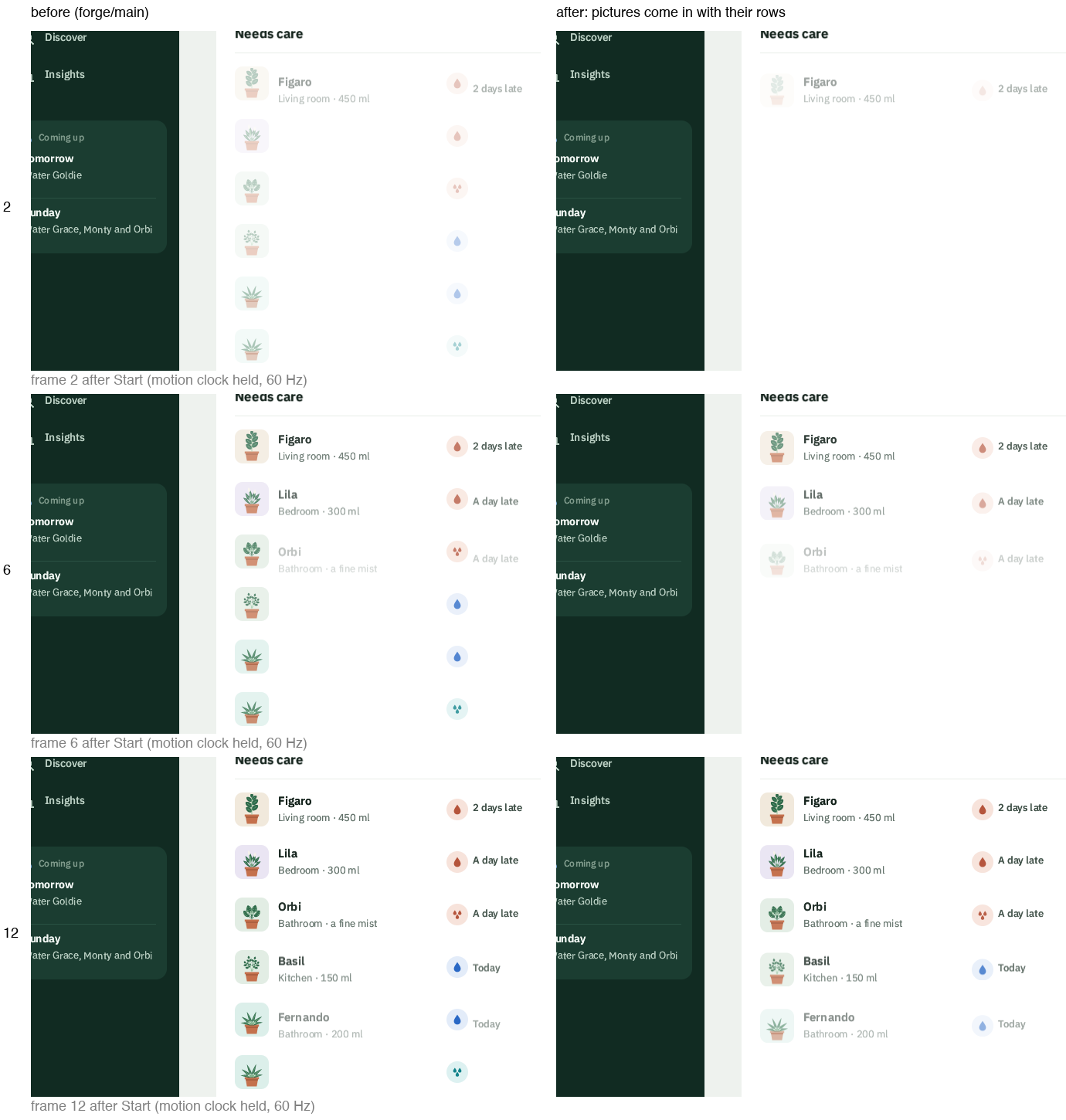
- Dragging the window narrower and back, Discover took 54 ms a frame. At every new width the engine did the same work again: it looked through 20,000 kept pictures one by one, and drew every component made of shapes, and every hidden one, again (one sweep of Discover drew 58,249 pictures). And when the list came in, the plant pictures arrived ahead of their rows.
- What changed
- The cache is searched through hash indexes; a component of shapes, or of nothing, also comes from the cache; a document's hash is taken only when its text changes. Once each width has been met, Discover went from 53.7 to 2.5 ms, My plants 21.9 → 1.5, Today 14.2 → 1.3. Across 140 runs before and after, the pictures are byte-identical. Pictures placed in a row now come in with their row.
- Still open
- Following the window costs something at the first frame: 21.7 → 29.7 ms cold, and mounting 25.9 → 45.7 ms. The new Tendwell is in the engine's gallery and not yet on this site: /play/ui-pages/tendwell/ is still the version from the October 30 entry.
My own test: a blank Today
- Development
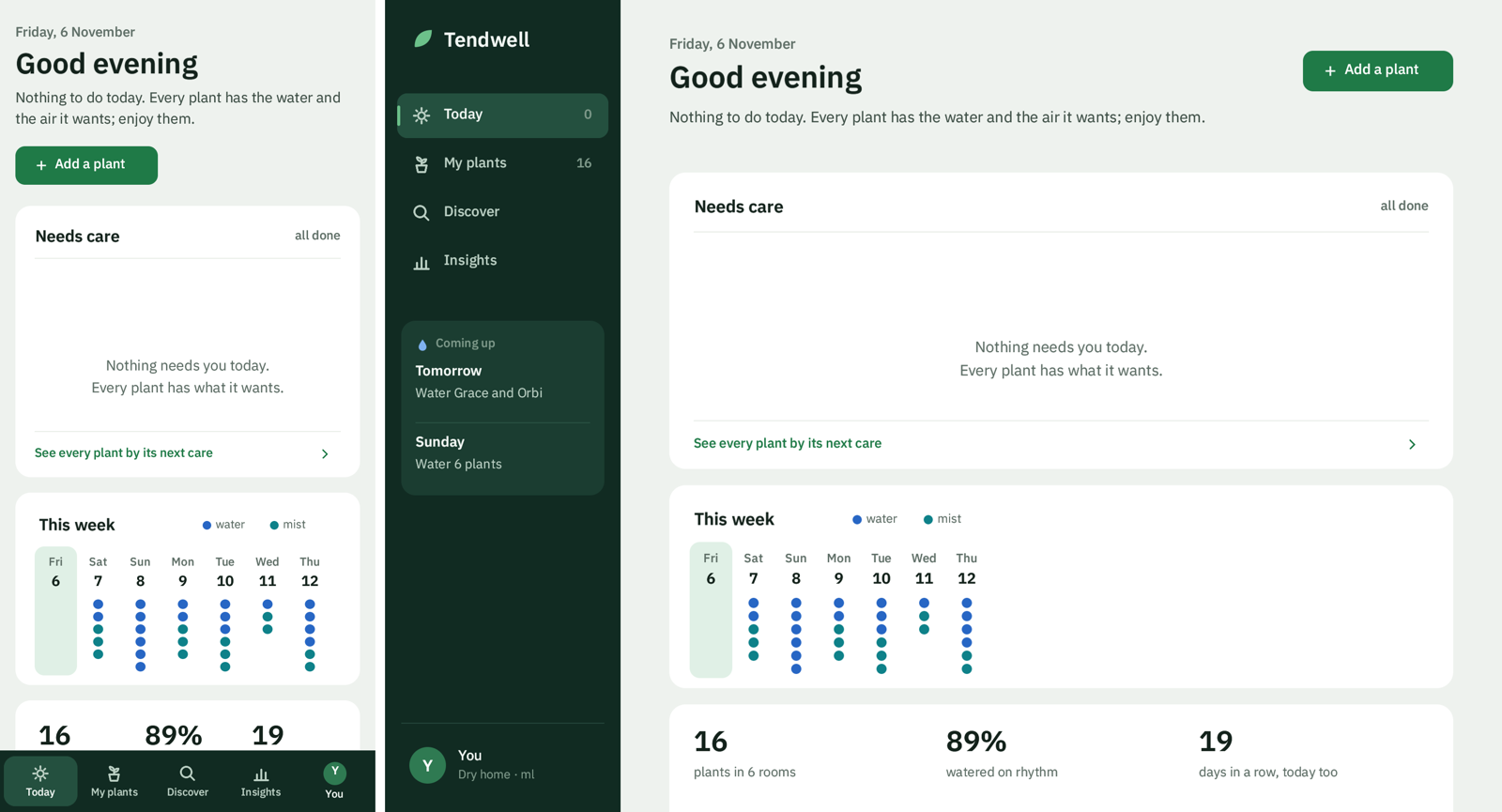
- In the evening I opened the packaged Tendwell.app and narrowed the window to a phone's width. Today went blank.
- Difficulty
- An agent reproduced it with no window, on a copy of my database. The reason is a little funny: I had done everything for the day. Today then shows one sentence saying nothing needs you, but under 1200 points the list is as tall as its rows, which is none, and the sentence, 92 points down that list, had no room. The engine refused the document, and every frame's drawing was undone.
- What changed
- Fixed the same evening. The list keeps 160 points of height when stacked. And the engine changed: in a window a person uses (the app, a packaged app, the web page), words that do not fit are cut with an ellipsis, and left out when not one line fits, instead of blanking the screen; the checking tool and the preview still refuse, so an author sees it. A test now runs "everything done, then narrowed to 1100 × 800 and 390 × 844"; with the old today.json it gives 6 refusals.
- Still open
- I only met this because I happened to have done everything. The agents' scripts could not narrow a window part way and then act; now they can.
One more round, with Sonnet
- Development
- When the Haiku round was fixed, I asked whether to run one more round with Sonnet. Two Sonnet agents built Freewheel and Larder, and the commit records every requirement working.
- Difficulty
- The Haiku round had left one gap: a screen reader and Tab went line by line across the whole screen, so two reading apps' sidebars were read between their list's rows, and both agents set the order by hand to get around it. Sonnet found a few more: a name field in a sliding sheet floated on the page before the sheet opened, and after it closed was still read and still took keys; Larder's detail pane was read in pieces; the two-character words 「今天」 and 「休息」 came out as 「今…」 and 「休…」.
- What changed
- Components laid side by side are now columns, each read whole before the next: the sidebar, the list, then the detail pane. A component that has left is not drawn, pressed or read; a short paragraph is as wide as its words, so Han is no longer cut; a minimum width can be 0. Again, each has a test that fails without it.
- Still open
- A list inside a container that is longer than its column does not scroll yet; the commit and the docs both say so.