ABYSS VANISH / DEVELOPMENT JOURNAL
Character Studio: Rebuilt on the iPad, Back in the Browser
November 3 to 6: an iPad app that answered no tap is replaced, the same code becomes the web version, motions play more smoothly, and each character gets body settings of its own.
I spent most of these days on the iPad. First the web Motion Studio’s keyboard would come up only once in iPad Safari; then the earlier iPad version of the studio answered no tap at all on the real device. I decided to start over: a complete Character Studio for the iPad first, then the same code running on the Mac and in a browser. Early on November 6 the web version went up on the site, and you can open it below. Agents wrote the code; I made the requests, tried things on the iPad and chose the direction.
The keyboard in iPad Safari
- Development
- On November 3 the work was on the web Motion Studio: typing a motion description on an iPad, the field has to bring up the keyboard, take Chinese input and line breaks, and a finger has to land where it points.
- Difficulty
- When Safari put its keyboard away, focus stayed on a hidden text box, so later taps on a field never brought the keyboard back. After an update, a tab could still be running the old program, so a fix that had not worked looked the same as a fix that had not arrived. And when the keyboard opened, the page’s shift was applied twice: in the regression test, fields and fingers were 13 points apart across and 44 down.
- What changed
- Transparent native text boxes now sit over the fields the engine draws, so a finger lands on the browser’s own input. The program files’ addresses carry their content’s sha256, and each build has an ID of its own. Text boxes and canvas share one origin. Two of the fixes have tests that were first run against the old version to make sure it fails.
- Still open
- These checks ran in Chromium and WebKit; whether the keyboard really appears on a physical iPad was left, in the commits’ words, for the user to confirm. The web Motion Studio stays at its old address.
Replacing an iPad app that answered no tap
- Development
- On the evening of November 5 I decided to stop repairing the iPad version Codex had made and to have a complete Character Studio built for the iPad instead: a library; creating a character (one sentence → a four-view design → approval → mesh, materials, skeleton, skinning); a character page (the stage, its motions, a new motion previewed for 24 hours, saving); and settings (the invitation code kept on that device only).
- Difficulty
- On the real device the old version registered no touch, scroll or key callbacks, so no button answered; its earlier “touch passes” had only checked that the handlers existed. The most honest tester, it turns out, was my iPad.
- What changed
- The engine’s host layer gained a full set of gestures (tap, long press, drag, swipe, two-finger pinch and rotate) on macOS, iOS, the web and X11. In the studio a drag turns the character and lets it spin on; two fingers zoom, turn and tilt; a double tap brings it back to the front. When I tried to paste my invitation code into the settings on the iPad, the empty field would not take it; the keyboard bar now has a Paste button.
- Still open
- The iPad version is installed on my iPad Air with a development profile. It has not been released.
One code base: iPad, Mac, browser
- Development
- My direction was two sentences: what the device can compute is not sent to the service, and there is one cross-platform studio, with the iPad’s interface as the reference. The repair that lifts feet out of the floor moved onto the device, running the same C the engine ran on the service; on a Mac it takes a few hundredths of a second a motion. The web version is the same source compiled to WebAssembly, with no second interface, and all three platforms share one list of sources, so a file added once is in all three.
- Difficulty
- The iPad canvas was fixed at 1180 × 820, so a wide screen could only enlarge it whole, and there were 12 motion buttons while a character can have up to 16 motions: the 13th could not be reached. Finding the feet went wrong too. A doll’s ankle stands high over a long shoe, and the old method took Lina’s toes for her ankles, so a repair would have bent each foot like a knee.
- What changed
- The stage now stretches with the window, the library is a scrolling stream of cards, and every motion is listed. Feet are now found by counting down each leg’s chain (hip, knee, ankle); for Lina that gives exactly the two bones her profile names. The web version uses the browser’s default font instead of packing a Chinese one, which took the site from 22 MB to 4.9 MB. The interface comes in Traditional Chinese and English (288 entries) and follows the system’s language the first time it opens. Early on November 6 the web version went up at /play/character-studio/; the old Motion Studio was left where it was.
- Still open
- Making designs and motions needs an invitation code; without one you can still browse the library, turn a character and play its motions. Measured on November 6 from the public address in desktop Chrome: the program is about 2.9 MB, opening the library downloads 21 design pictures totalling 8.6 MB, and opening Baker Grandma downloads a 3.8 MB model package. In a window smaller than 1000 × 820 the whole page is scaled down.
Why motion looked stepped
- Development
- On November 6, motion kept looking stepped to me, even motion captured at a high frame rate.
- Difficulty
- There were two causes. The engine blended straight from one key to the next, so a bone’s speed jumped at every key, and the studio drew on a 30 Hz timer, showing half the frames of a 60-key-a-second motion. Looking further, many generated motions turned out to be 30 keys a second filled up to 60 (TakeOrder, GetUp, Serve), each added key a straight halfway point.
- What changed
- Sampling now follows a curve through the neighbouring keys (Catmull-Rom), matching each key exactly where it falls on one, and the stage draws at the display’s own rate while it moves. The service stopped filling motions up to 60 and keeps the rate they were generated at (HY-Motion 30 keys a second, MoMask 20), which also drops the doubled data. The stage gained Smooth: off, light, medium and strong (0, 0.025, 0.045 and 0.08 s). Measured on Lina’s motions: a punch’s jitter fell 40%, 45% and 57%, a wave’s 46%, 59% and 76%.
- Still open
- Smoothing also costs speed: at strong, the punch’s top speed falls 37%, so it is off by default, and whether and how much to smooth depends on the motion. In the public web version smoothing is one setting for the whole device; keeping it per motion on the character came after this build and is not on the site yet.
A character’s body
- Development
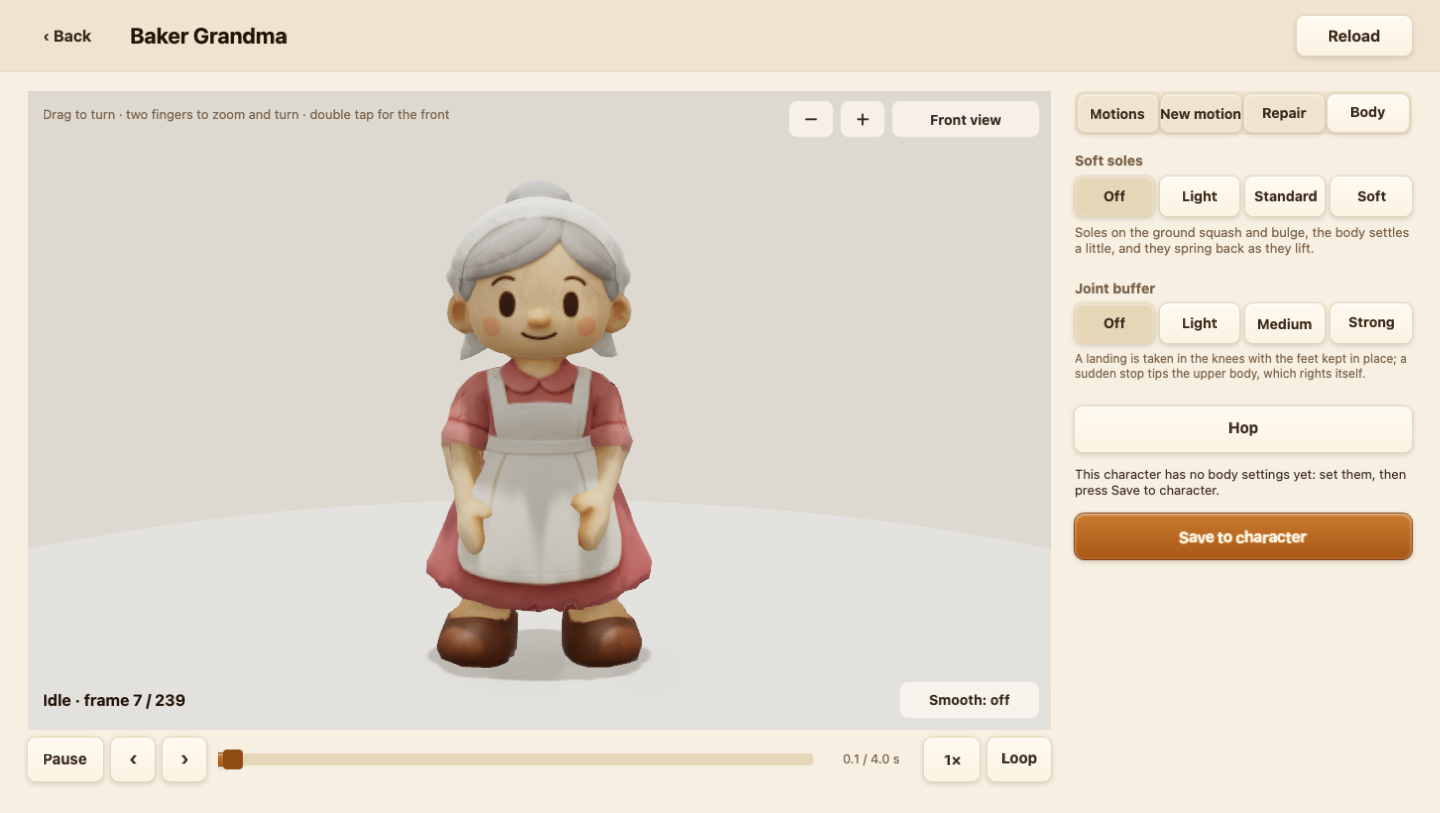
- Gen Town’s soft soles and the landing buffer Motion Check used to bake into a walk became one set of character body settings: tuned in Character Studio, kept on the character, and played the same way wherever the engine shows it.
- Difficulty
- The old landing buffer was baked into one Walk in advance, so it was gone as soon as the motion changed. Jumps and falls have no physics of their own in the engine yet, so to see a landing, the character first has to leave the ground.
- What changed
- Each frame the engine works out the pelvis’s acceleration from its place, and the body answers as if standing on a damped spring: a landing is taken in the knees with the feet kept where the motion put them, a sudden stop tips the upper body forward before it rights itself, and standing still or moving steadily it is the original motion exactly. In the test, a 0.3 m jump sinks 2.8 cm into the knees three keys after touchdown and is back within a second. The studio gained a Body tab: soft soles (4, 8 and 16 mm), joint buffer (3, 6 and 10 cm), Hop to jump the character 0.3 m in place and watch it land, and Save to character, which the service keeps, every save of it. The repair tab gained Suggest, which reads from the keys when each foot is on the ground: Lina’s Walk and Run step left and right in turn, with both feet down in between. Gen Town’s residents are connected too: body settings saved on a character go into the town when it is built.
- Still open
- Saving needs an invitation code. None of the 13 residents has saved body settings yet, so the town shows no difference. Hop stands in until jumps have physics, and a suggestion is only a suggestion until someone has looked at it.
What came next (November 16): Motions Now Play on the Web, and a Robot Grown from One Video Frame