Toon Lines on the Town, Footprints in the Snow
October 30: Gen Town's web version is updated in place eight times, and toon outlines, footprints in snow, soft soles and a game-only public page go live; the houses get furniture and bathrooms, and players' reports get fixed one by one
The last entry was still about the UI engine, and Gen Town was not idle either: between midnight and early morning, version 2 on this site was updated in place eight times, each time with a way back (the host holds eight rollback folders). I picked the cartoon look, and first the far ground was painted solid black, then the hero's white sleeves broke out in ink dots; it took three fixes to come clean. I also wanted footprints in heavy snow, so the snow now keeps tracks, left and right in turn, and the soles went soft and springy. Early in the morning the tuning cards all went behind the gear, so the page opens on the town alone. The same day Viper, the AI critic we raise ourselves, gave the gameplay a 0; we have not put work into the gameplay yet, so 0 is fair.
Previous: Three Jurors, Fifteen Pages →From pretty to lived in
This entry follows the development build of October 30 up to the eighth update, early in the morning. The thread runs: the toon look → snow and soles → settings behind a gear → houses people can live in → what players saw → putting old things away. The first three and the fifth (all but the greeting) are already in Gen Town on this site; life inside the houses is so far only in the engine's headless tests.
The toon look
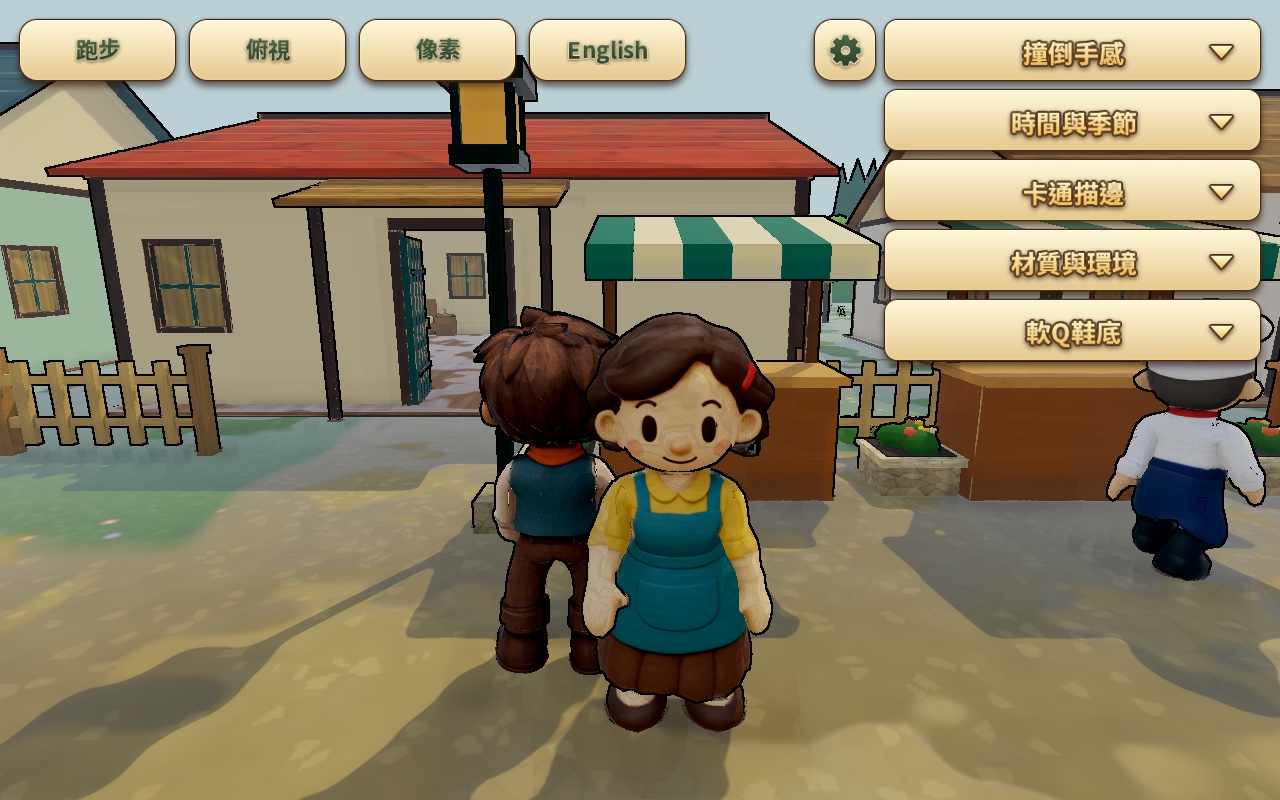
I chose the cartoon look. Toon is a group of renderer settings switched on and off together, on Metal, GLES, Vulkan and the web's WebGL; the web version gains a Toon card on the right.
- How we worked
- The renderer settings go to version 9 with five new fields: on/off, light steps (2–5), softness, ink and line width (1–3). Direct sunlight falls into steps and the shadow edge hardens in the scene pass; composition draws ink at silhouettes (a neighbouring pixel 3% farther away, or sky) and at creases. The Toon card has the switch, light steps, softness, ink, width and a reset.
- What was hard
- At width 3, far ground and walls were painted solid black: on a surface seen at a grazing angle, the pixel three up is more than 3% farther, so it counted as an outline. Once live, noise showed on the characters, worst on the hero's white sleeves: a one-pixel crack in a model looked far to all four directions' samples and drew a 3×3 grid of dots, and the stepped sunlight followed the material's normal, whose wood carving broke arms and sleeves into patches. After that fix the web page still showed dots and short double lines: WebGL draws without multisampling, so cracks can be two pixels wide.
- What we did
- A silhouette now needs its far side more than twice as far behind as the near side lies in front, and a crease must be clear; ink must hold at the line's width and two pixels past it (24 depth reads a pixel). The stepped sunlight follows the smooth vertex normal, with carved detail adding half its light unstepped. Cost: toon took gen_town's GPU time from 11.6 to 13.6 ms (2048×1536, M5); reconstructing depth twice a pixel and dividing once a sample brought it to 0.7 ms (three rounds), with the same picture (1 of 1,024,000 pixels differs by more than 8 levels).
- Still open
- Toon is off by default on the web; the card turns it on. It is not among the 11 checks run before each web release, so clean sleeves still take someone looking.
Footprints in the snow, soft soles
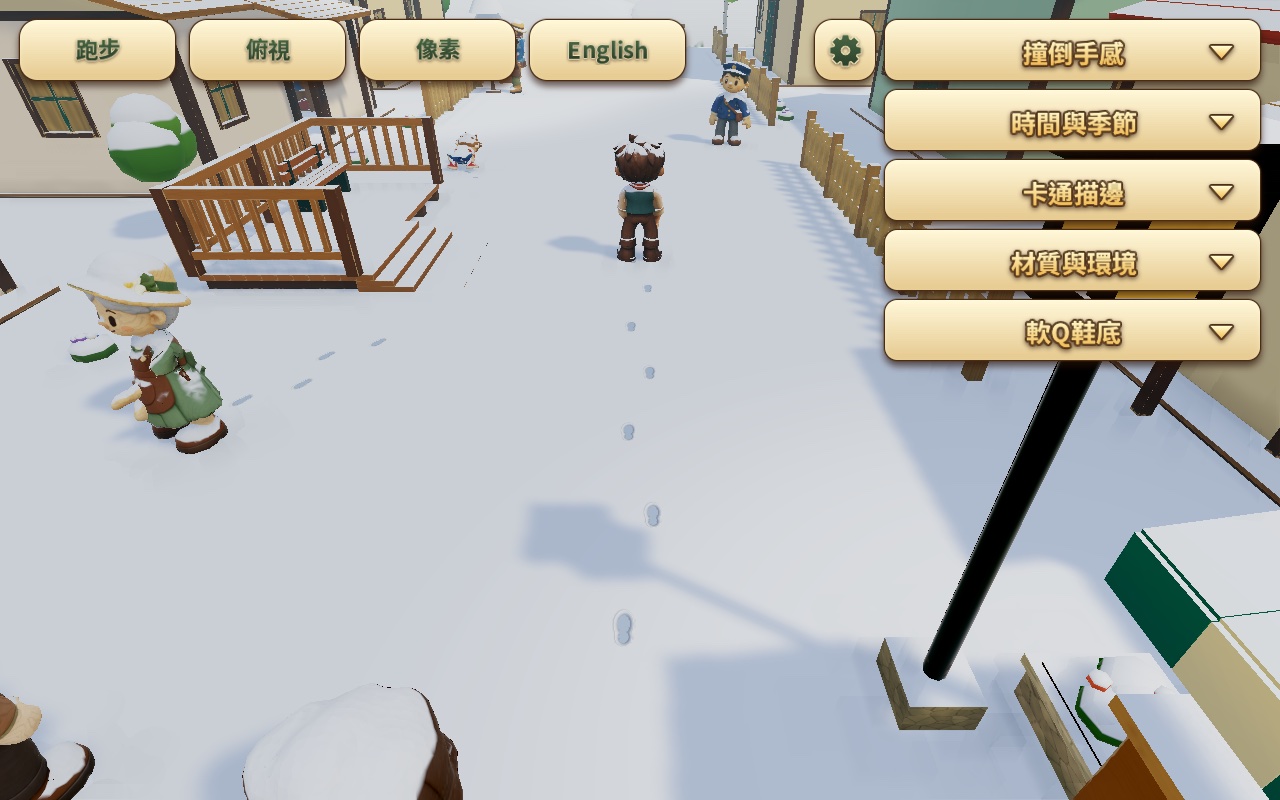
I wanted footprints in heavy snow.
- How we worked
- The world keeps its own tracks (up to 2,048, reused in a ring): every character that stands on two feet lays a print each step's length it walks, left and right in turn, as far apart as its rig keeps its feet, toes pointing the way it goes. The picture takes the 64 nearest the view within 25 m, as deep as the snowfall left them; a new footprints layer draws sole and heel, steep walls and a low rim, and thin snow shows the ground.
- What was hard
- Reading footfalls off the animations was tried first and dropped: the AI-made runs touch down two or three times a step and skip steps, which left a print every 2 m.
- What we did
- Now the world lays prints by step length. Cost (M5, 1280×720): all 64 prints for every pixel 0.7 ms, within circles 0.43 ms, in 16 boxed groups about 0.2 ms; nothing where no snow lies. In the check the hero ran 7.13 m and left 7 prints, 0.102 m either side, 1.0 m apart; on the site, a 3-second run leaves 7. Then I wanted a soft, springy sole that adapts to the ground, tuned like the landing buffer I set in Motion Check (amount, recovery time, damping): as a foot nears the ground the character settles into its soles (a damped spring; under 1 it bounces on landing), each column of sole squashes on its own and bulges sideways, and a foot in the air springs back; on a step's edge or a slope only what presses squashes. The sixth card, Soft soles: a switch, amount 0–30 mm, recovery 0.08–0.8 s, damping 0.2–2. On the V5 residents' walks, squash is at most 7.5 mm at 8 mm with no point under the ground; for the town's 14 characters the squash work is 1.6–1.7 ms a frame.
- Still open
- Prints are left in snow only; soft soles are off by default. The site's release checks do not walk through snow, so prints are measured separately.
Settings behind a gear
- How we worked
- First a tidy-up of the shaders gen_town draws: every material and layer names its page in the settings panel. Only wood had a place before, and twelve groups filled Quality's 16 pages; now Quality has 4, lighting 2, materials 8, colour 6 and atmosphere 8. The web version's fifth card, Surfaces & weather: a materials page (wood grain, stone mottle, metal rust, cloth weave, glass darkness, glaze gloss, wear and dirt) and an environment page (wind, leaf glow, snow, puddles, rain, cloud cover, footprint depth), a switch and a slider a row, and a reset; All settings opens the engine's own panel.
- What was hard
- Phones and browsers have no Escape key to close the panel, and its top-right button said Discard but did what Cancel does. I also asked what edge antialiasing costs: the first measurement said 4x MSAA 17.8 ms against 9.7 off, with 2x as dear as 4x, which made no sense. The window drew at 2048×1536 and the benchmark at 2048×1280, and the two shared one set of render targets, reallocated every frame.
- What we did
- The button is now Close, and the host closes the layer. All settings became a gear at the top right, and the settings panel is laid out by named section in the town's own look. Measurement now runs only at the window's own size and refuses another; at one size, 4x MSAA is 11.4 ms against 10.9 ms off (2048×1536, M5).
- Still open
- Since the last update of the morning, the public page opens on the town alone, with the five tuning cards behind the gear and All settings beside it. As of then, in portrait on a phone the buttons and the gear were still small.
Houses people can live in
All of this is in the engine and its headless tests so far; Gen Town on the site does not have it yet.
- How we worked
- First, what the day before left unfinished: residents lying in bed. Each sleeper's lying down and getting up is made from its own bed (generated with Kimodo, retargeted with the mattress and pillow as support). Then I asked to fill the houses and add rooms, built from basic elements up to finished things, data driven, with the Vault as the library: the assembly library has 14 elements, 7 assemblies, 6 rooms and 3 plans, and a cottage is four rooms with partitions and doorways. Next came a recipe of what people do at home today: the day's shares from ATUS 2024 (the American Time Use Survey), 40 activities and what each of 8 rooms needs. It showed the cottage plan had no bathroom, so the bathroom came first: toilet, washbasin, mirror, shower, towel rail, counter, sink and fridge. Then a looping chore, washing up: a resident walks to the sink, faces it, loops the motion a few rounds and goes on with the day. I also asked for new land: two terrain tiles open east of the town, the street runs through the east gate, four homes are built and four households move in whole.
- What was hard
- Along the way, a string of small faults. A resident lying in bed showed its first pose, standing by the bed: at the end of the clip, time wrapped round to frame 0. A resident that stopped just short of its chair chose the same chair again after resting but let go of it, and physics shoved it 0.2 m. With rugs laid, a click on a rug walked nowhere. The walk from the front door to the bedroom crossed the kitchen and shoved the dining chairs 0.15–0.2 m. Once chairs were obstacles to plan around, the hero could not sit: a chair's spot lies on its front edge, up to 2 cm inside it.
- What we did
- A clip held at its end stays on the last frame; a resident near its own piece keeps hold of it; rugs let a click through; pieces marked to avoid are obstacles in the plans yet can still be pushed (toys and crates are not avoided: they are there to be pushed); a seat spot up to 5 cm inside its chair is planned to without that chair. A headless day: 13 residents sat or lay, up to 4 lying at once, and chairs, tables and beds drifted 0.0 cm instead of 0.25 m. With the new district and bathrooms, the hero sat on every chair and lay on every bed of eleven one-storey homes, spot error 0.000 m, nothing shoved, and over the residents' day the most anything moved was 2.1 cm. Washing up: the eatery auntie washed for 57 seconds, a 3.6-second loop with a 0.8 cm seam, her wrists 1.4 cm from the scrub path on average.
- Still open
- Gen Town on the site has none of these rooms, bathrooms or the new district yet; the recipe still has 42 elements to make.
What players saw
Several reports this day came from people playing on the web (passed on through the multi-agent coordination session), and some I pointed out myself. Our own AI critic, Viper, scored version 2 the same day: visuals 7, gameplay 0.
- How we worked
- Two went live after midnight. Clicking the ground to walk, the hero got in the way: a click on him walked nowhere. Of 165 clicks over the hero, 42 used to hit him; now none do. The house door frames flickered: the jambs' inner faces lay exactly on the walls' cut faces and fought over the same plane; the frames now stand 5 mm into the opening, and faces anyone can see lying on one another in the town went from 89 to 16.
- What was hard
- Chasing residents never reached one: a click on a resident hits its body, and the game moved only on ground clicks, so every such click moved 0 m. The mail quest wants residents to notice the player and the one receiving a letter to react clearly, but a flow could not direct a resident at all. Someone looking at the public page said the tab read the engine's control hints, the tuning cards covered the screen, and a resident stepping between the camera and the hero hid half of him. The Chinese slider labels mixed two languages on one line. Measured on a phone: on a page narrower than the UI's 1024-point canvas (390 portrait, 844 landscape) the UI vanished entirely.
- What we did
- A click on a resident walks up to them (to 0.32 m, no knock), a double click runs into them (a resting one falls in 1.5 s, a walking one in 4.2 s). Residents turn to face a nearby player; a new greeting brings a resident hurrying to about a metre in front of the player, turning to them and hopping twice (9 cm) before going on with its day. The knock rule was fixed on the way: walking into someone never knocks yourself down. The public page shows only the game, its tab says the game's name, the cards sit behind the gear, and a resident in front of the hero fades as walls do. Chinese labels are Chinese only. On phones the UI is drawn and laid down smaller, so portrait, landscape and a 700×700 page all show the top buttons and the gear.
- Still open
- The eighth update, early in the morning, put the resident click, the game-only public page, the one-language labels and the phone UI on the site; the greeting is in the engine only. As of then, on phones the UI was still small and a tap on the ground did not yet walk; phones were measured only in Chromium's emulation on a Mac (390×844, opened over the network in 20.6 s, 77.1 MB, 60 fps).
Putting old things away
- How we worked
- Gen Town replaced the old OpenWorld town and the Life players, and I retired them: 7 players (native, web, EGL, Vulkan and others) went, with the code and tests only they used. The home-v3 paper doll was a small experiment, and its 1,440 files retired too; tests left behind by Character Lab (retired 10/21) that could no longer run were cleared.
- What was hard
- A Forge proposal takes at most 1,000 files. home-v3's change ran every check before it was refused, so it went in two parts of 900 and 540; the change touched 1,472 files, and comparing them alone took 2.5 minutes.
- What we did
- The submit tool now refuses more than 1,000 paths before it starts, and compares by reading each revision's tree once. What is still used stays, such as the human-v1 body the 3D workflow's chef assets use. After the cleanup the default build's 319 tests all pass.
- Still open
- Everything retired stays in git history; on the site's work pages, Abyss Town and OpenWorld are marked retired and replaced by Gen Town.
Next
Next, the greeting goes into the mail quest. Life in the houses is still in headless tests, and the recipe has 42 elements to make. We take Viper's gameplay 0.